Event dashboards and products
Every event on the Live Map links to a set of ready-made products: dashboard images, PDF bulletins, spreadsheets and GIS files that ADAM generates automatically minutes after detection and refreshes as better data arrives. This page explains what each product contains and how to read it.
Products open in a new browser tab from the Useful Links of a popup and are attached to or linked from alert emails. They are plain files hosted on WFP servers, so you can save, print and forward them.
Products by hazard
| Hazard | Product | Format | What it answers |
|---|---|---|---|
 Earthquake Earthquake | Dashboard | JPG image | Where, how strong, how many people within reach, which WFP offices are close |
 Tropical storm Tropical storm | Wind Map | JPG image | Track, forecast positions, wind buffers, people at risk, WFP presence |
| Rainfall map | JPG image | 5-day accumulated precipitation forecast along the track | |
| Population table | XLSX and CSV | Exposed population per administrative unit and wind buffer | |
| Shapefile | ZIP | Track, forecast positions and wind buffers for GIS software | |
 Flood Flood | Flood event report | PDF, 2 pages | Satellite-observed flooded area, population and cropland affected, aggregation by district |
| Flood forecast bulletin | PDF, 1 page | Rainfall and river flood forecast for the next 7 days, places of concern |
Earthquake dashboard
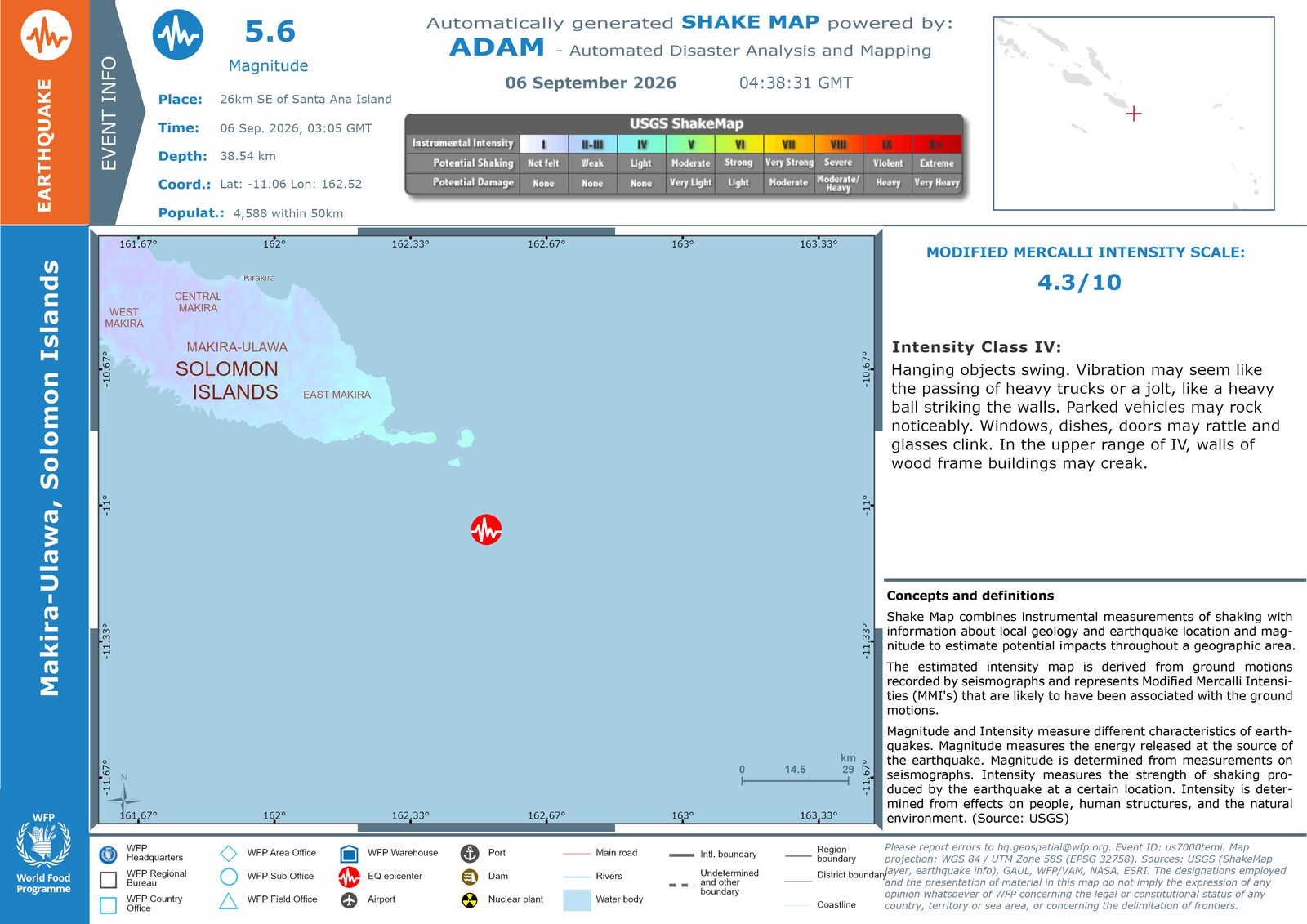
Reading it from the top left:
- Event info: magnitude, place, origin time in GMT, depth, coordinates and the population within 50 km of the epicentre.
- USGS ShakeMap scale: the colour ramp used on the map, with the perceived shaking and potential damage for each intensity class.
- Map: the epicentre marker over the shaking intensity raster, with administrative boundaries, WFP offices and warehouses, ports, airports, dams and main roads when present.
- Modified Mercalli Intensity: the maximum intensity estimated for the event, with the plain-language description of that class.
- Concepts and definitions: what a ShakeMap is and why magnitude and intensity are different numbers.
Initial and refined versions
ADAM publishes a first dashboard from the epicentre and magnitude alone, minutes after the event. When the USGS ShakeMap becomes available the dashboard is regenerated with the shaking raster and the intensity value. You may therefore see two dashboards for the same earthquake; the ShakeMap version supersedes the initial one.
The population figures in the dashboard and in the accompanying table are exposure, not damage: the number of people living in the area that experienced a given shaking level, from the WorldPop 2020 grid.
Tropical storm products
Wind Map
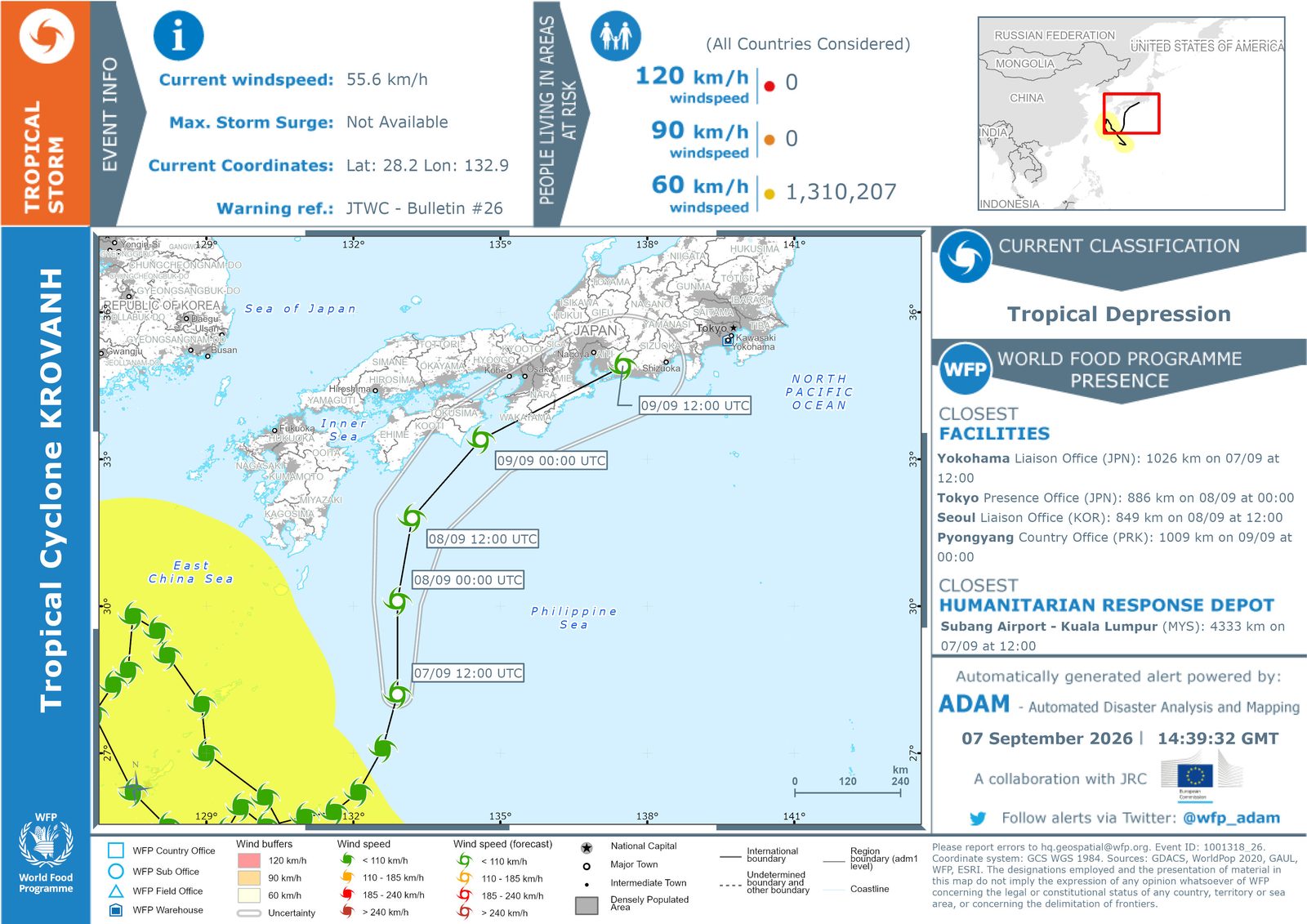
- Event info: current wind speed, maximum storm surge when available, current coordinates and the warning bulletin the product is based on (JTWC or NOAA).
- People living in areas at risk: exposed population inside the 120, 90 and 60 km/h wind buffers, all affected countries considered.
- Current classification: from tropical depression to category 5.
- WFP presence: the closest WFP facilities and the closest UN Humanitarian Response Depot, with distance and the forecast time of closest approach.
- Map: observed track, forecast positions with their timestamps in UTC, the uncertainty cone and the wind buffers. Glyph colours follow the same wind-speed classes as the Live Map legend.
Rainfall map
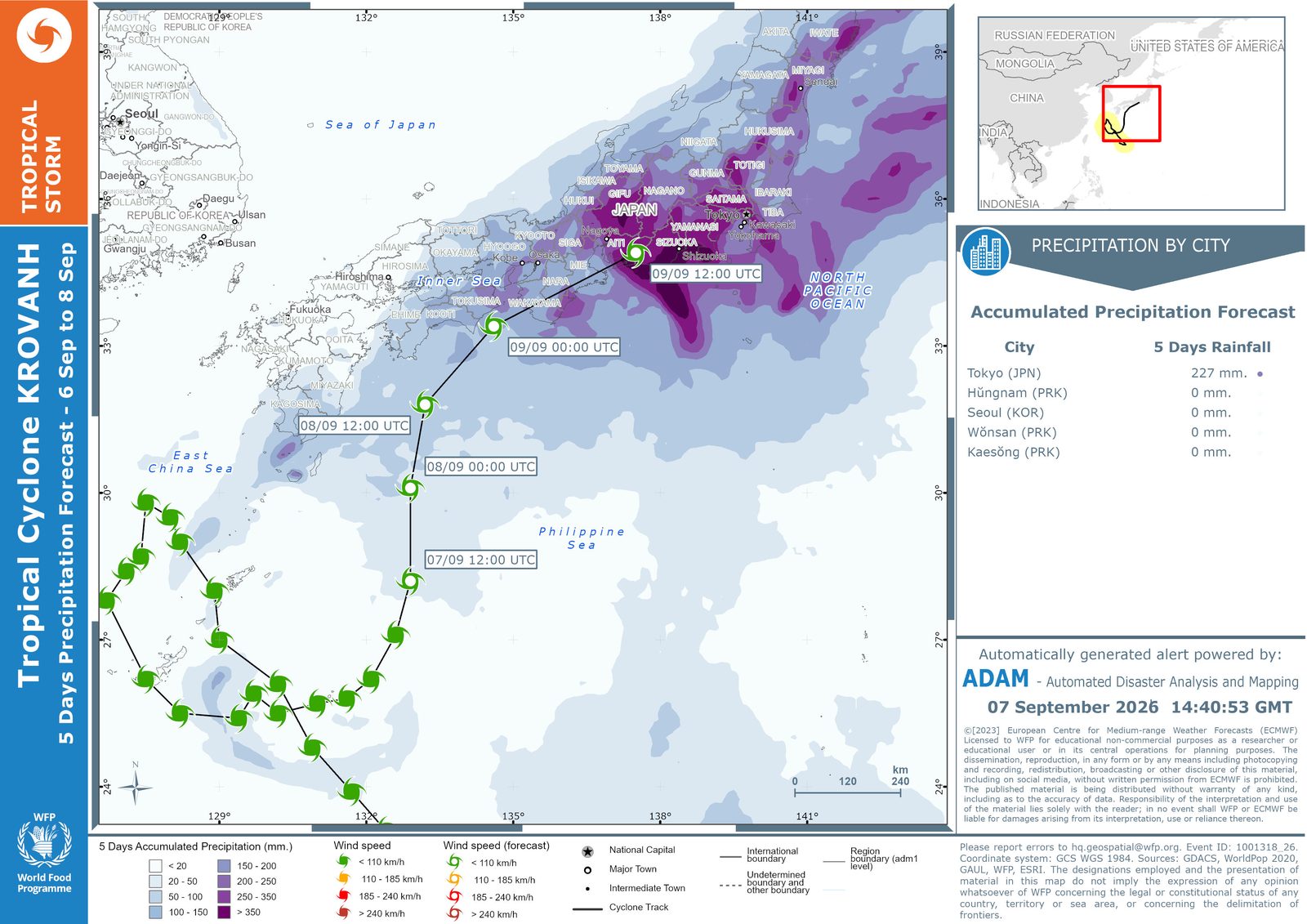
The 5-day accumulated precipitation forecast from ECMWF, with a precipitation by city table for the main populated places on the track. Use it to anticipate flooding and landslides where the wind alone would not be a concern.
ECMWF licence
The rainfall product carries the ECMWF licence notice printed on the map. It is issued for planning purposes within the humanitarian community and may not be redistributed publicly or on social media.
Population table and shapefile
The population table lists the exposed population per administrative unit and wind buffer, ready for pivoting in a spreadsheet. The shapefile bundle contains the track, the forecast positions and the wind buffers, and is the quickest way to bring a storm into a GIS project. For repeatable workflows, prefer the API collections over downloading files event by event.
Flood products
Flood event report
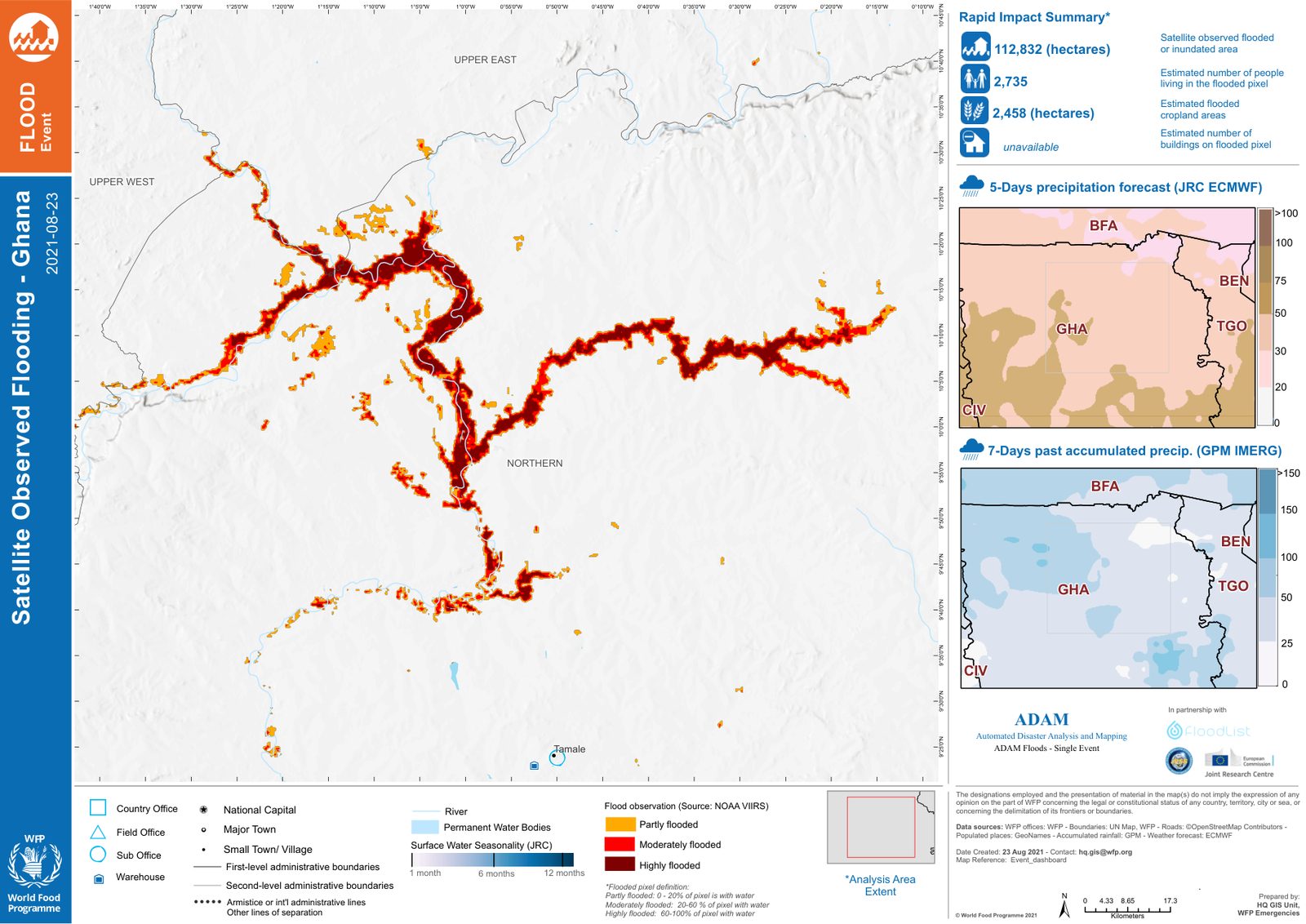
- Rapid impact summary: flooded or inundated area in hectares, estimated people living in the flooded pixels, flooded cropland, and buildings when available.
- Map: flood observation from NOAA VIIRS, classed as partly, moderately or highly flooded by the share of each pixel covered by water, over the JRC surface-water seasonality layer.
- Side panels: 5-day precipitation forecast (JRC and ECMWF) and 7-day past accumulated precipitation (GPM IMERG).
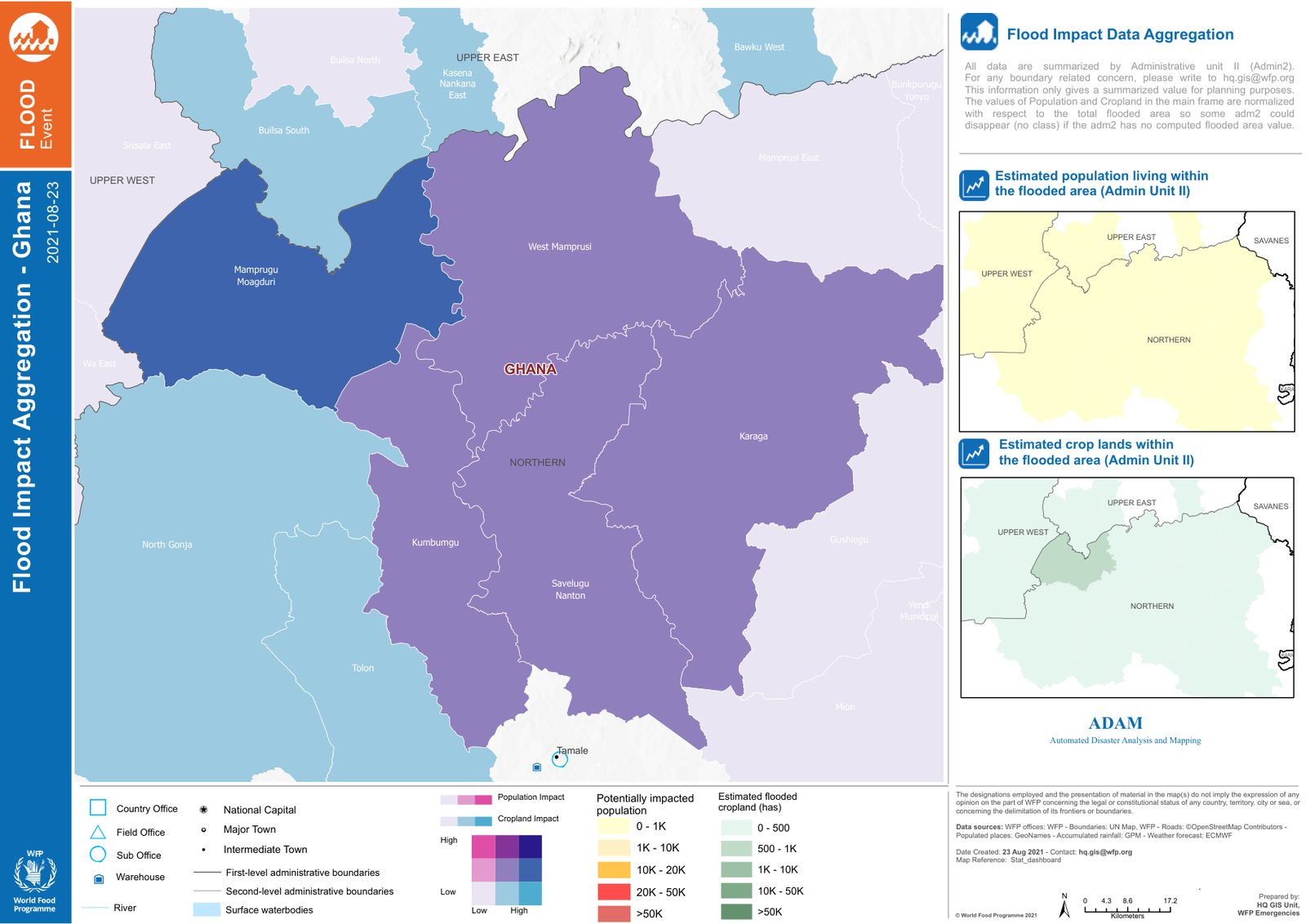
Population and cropland figures aggregated by second-level administrative unit, as a bivariate map and as separate class maps. Units without a computed flooded area are left unclassed.
Flood forecast bulletin
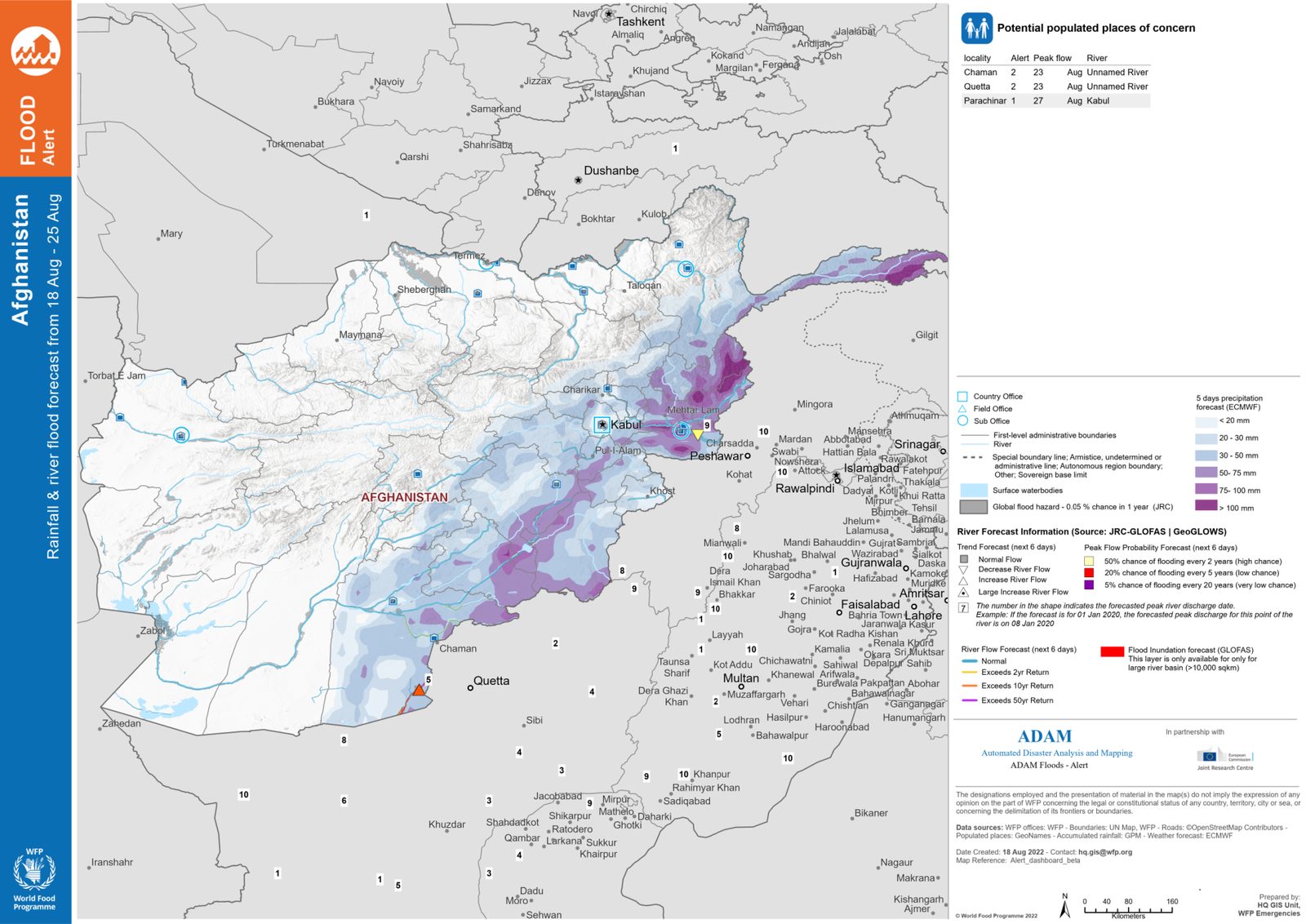
- Potential populated places of concern: localities with an alert level, the forecast date of peak flow and the river.
- Map: 5-day precipitation forecast (ECMWF), river forecast points from JRC GLOFAS and GeoGLOWS with the trend for the next 6 days and the probability of exceeding the 2, 5 and 20 year return period, and the GLOFAS inundation forecast for large basins.
- Numbers in the river symbols are the forecast day of peak discharge.
Reading the impact figures
- Exposure is not damage. ADAM counts people, cropland or buildings inside a hazard footprint. It does not estimate casualties or losses.
- Products are automatic. No analyst reviews them before publication. Check the event against local information and use the products to prioritise, not to conclude.
- Products are versioned by re-issue. Cyclone maps are reissued at each forecast cycle and earthquake dashboards when the ShakeMap arrives. Always take the latest one from the Live Map.
- Sources are printed on each product: GDACS, USGS, JTWC, NOAA, ECMWF, JRC GLOFAS, NOAA VIIRS, WorldPop, GAUL and WFP data. Report errors to hq.geospatial@wfp.org.
Next steps
- Live Map to find the event and open its products
- Alerts to receive products by email as they are issued
- Use ADAM in QGIS to work with the underlying data instead of the images